
GTA 6: How to Sell Cars, Register and Keep Stolen Vehicles
By GTA EXP Team · Updated 21 Nov 2026
Quick answer
Sell untracked stolen cars to Moses in Port Gellhorn after his Chapter 2 introduction. Pay ’n’ Spray buys eligible cars as your selling options unlock; Standard Tracker cars become eligible early in Chapter 3. To clear a full garage, open Stored Vehicles at Pay ’n’ Spray with R1/RB. Randy’s later Chapter 3 jobs unlock his Wish List and further selling options.
On this page
Where should you sell your car?
| What you want to do | Start here |
|---|---|
| Sell an untracked stolen car in Chapter 2 | Moses’s garage in Port Gellhorn, after his introduction. |
| Sell a car with a Standard Tracker | Pay ’n’ Spray after Moses’s early Chapter 3 message. |
| Sell a stored car or free a vehicle slot | Pay ’n’ Spray → Stored Vehicles, using R1/RB. |
| Sell a high-end car to Randy | Check WAINK for his interest and compare his offer. His main car-selling unlock comes later in Chapter 3. |
| Keep a stolen car | Choose Register at a buyer who accepts it. You need the fee and an available vehicle slot. |
How to sell stored cars when your vehicle slots are full
You can sell a stored car from the Stored Vehicles menu at Pay ’n’ Spray without fetching it and driving it across the map.
- 1Enter a Pay ’n’ Spray lot and press R1 on PS5 or RB on Xbox to open Stored Vehicles.
- 2Select the registered or garaged vehicle you want to sell and review its offer.
- 3Confirm the sale. Selling a registered vehicle frees its registration space for another car.
Here’s a video showing how to sell a stored car and free up a vehicle slot at Pay ’n’ Spray.
Check your BuckMe balance before selling. Pay ’n’ Spray pays into that account, and its balance limit can hold up the payment.
How to check a car’s tracker, buyer and value
Hold Up on the D-pad to open WAINK, point it at the vehicle and hold R1 on PS5 or RB on Xbox to scan. Read the tracker status, sale value, registration cost and interested buyer. The scan also identifies security features and condition.
Press the right stick (R3) to cycle between Protection & Price, Further Details and Vehicle Stats. GameRant’s Jake Fillery explains that the performance tab requires you to get into the car and start its engine. Use the first two tabs to check the tracker, cost and other details before getting in. [14]
A high sale value is only useful if you can deliver the car to a buyer who accepts it. For a keeper, compare the registration fee with your available money and garage space before taking it.
How to sell cars to Moses in Chapter 2
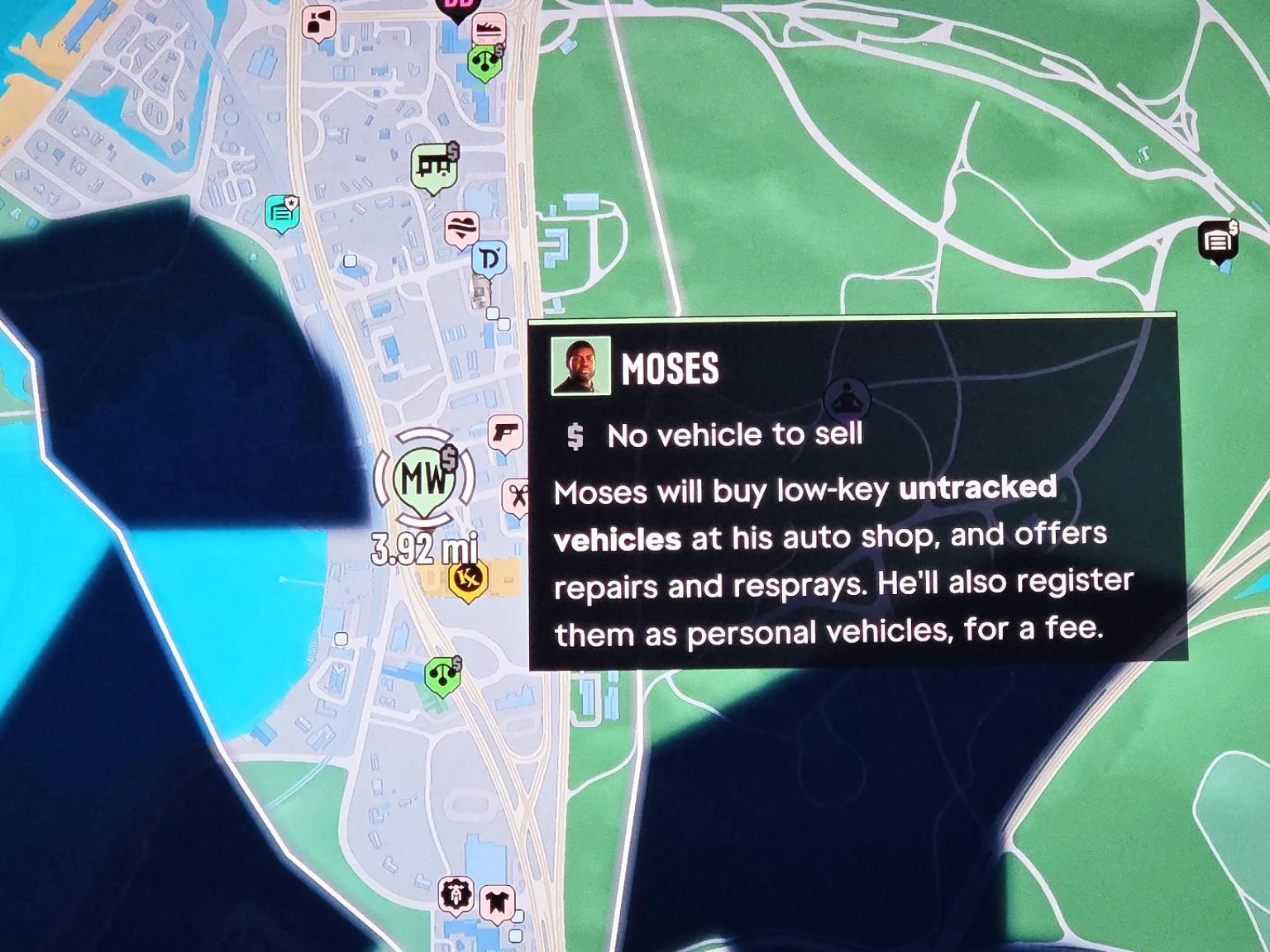
Moses’s garage is in Port Gellhorn. His introduction, Take a Vehicle to Moses, becomes available to Lucia after Girl’s Trip. Complete it to open his selling and registration services.
- 1Scan a car with WAINK and check that it has no tracker.
- 2Choose a vehicle away from Moses’s garage. Cars taken too close to his business can be refused; the main road through Port Gellhorn is an alternative.
- 3Bring the car into his garage and choose the sale option.
- 4Read the offer before confirming. If you want to keep the car, use registration instead.
After a sale, Moses’s garage briefly closes. Allow roughly one or two minutes before trying another delivery. A closed door immediately after selling a car can simply be this cooldown.
How to sell cars at Pay ’n’ Spray
Find a shop through Index → Vehicles → Pay ’n’ Sprays. Drive into the lot, choose Sell for your current vehicle and check the offer before confirming.
For cars with Standard Trackers, wait for Moses’s message near the start of Chapter 3 confirming that Pay ’n’ Spray can buy and register them. A shop being open for repairs does not mean every selling or registration service is unlocked.
Pay ’n’ Spray has a reported limit of three vehicle sales per in-game day. If you see a daily-limit message, wait for the next in-game day. This differs from Moses’s brief garage cooldown.
Should you sell cars to Randy or Pay ’n’ Spray?
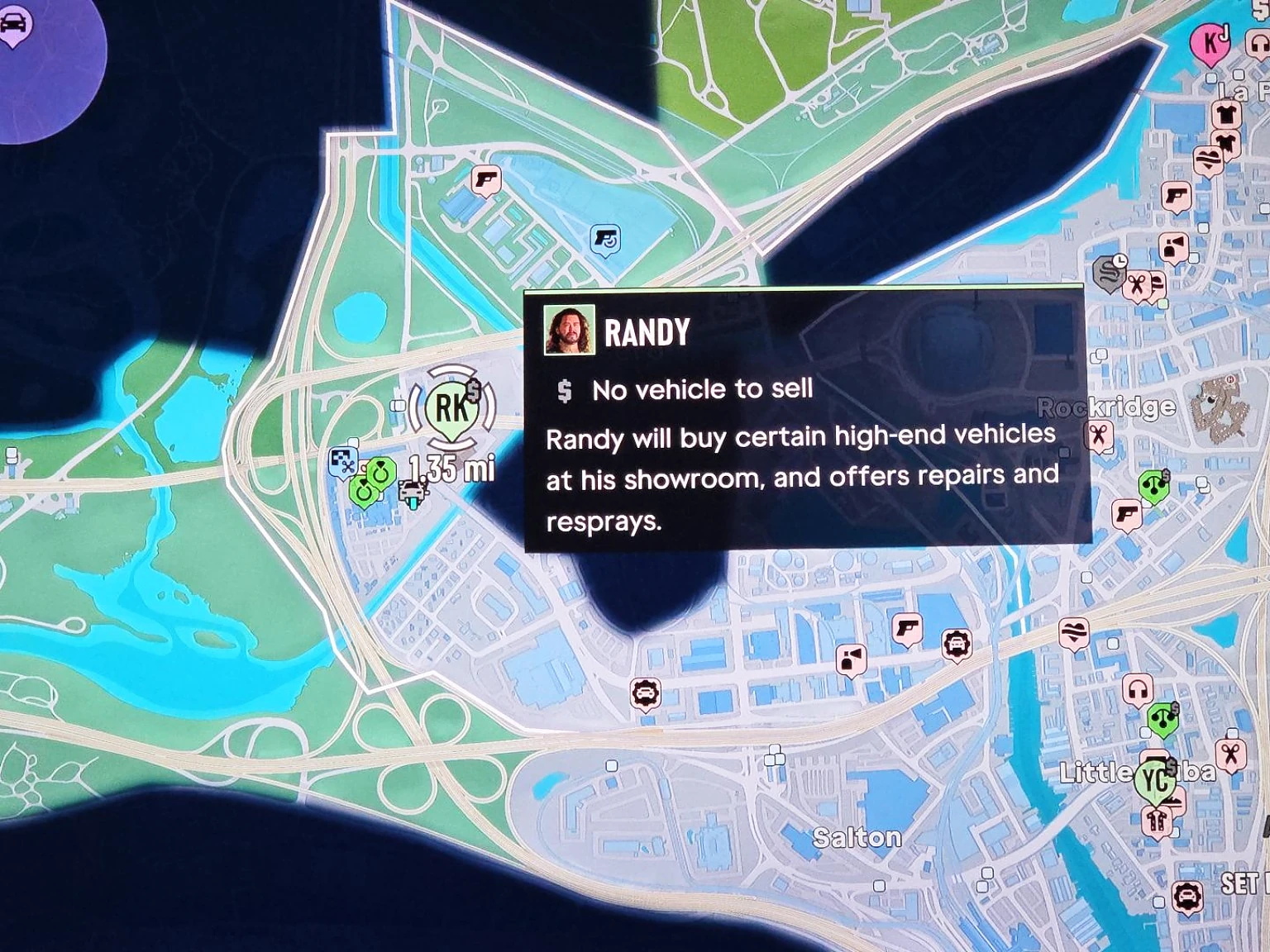
Randy is useful for his requested cars, better offers on some exotics, and jobs that unlock advanced-tracker sales at Pay ’n’ Spray. If the local shop accepts your car and Randy has no request or better offer for it, selling nearby saves you the trip.
| Your situation | What to do |
|---|---|
| Randy wants the car for his Wish List | Deliver it to him to complete the request. Keep it in good condition for a better payout. |
| You have an exotic car to sell | Scan it with WAINK, then compare the available buyer offers under Index → Robberies. |
| You have an ordinary car the local shop accepts | Use Pay ’n’ Spray when Randy offers no extra benefit for that car. |
| You want to sell advanced-tracker cars locally | Progress Randy’s car requests. Expand the unlock steps below for the required job. |
Randy’s board is empty or his mission is missing
His Wish List opens through a later Chapter 3 story job. Meeting Randy is only the first step. Once it is unlocked, open Map → Robberies → Randy’s Wish List to see outstanding cars, even if the physical board is hard to read. Scanning or entering a requested car also shows a delivery prompt.
Tip: Can’t find Hathaway Apartments on the map? Give Randy a little time after his call: he follows up with a text containing the location. Check his message before heading off to search Ocean Beach.
If Randy refuses a car, check its WAINK buyer information and your current requests. A high price or advanced tracker alone does not tell you whether he will accept that vehicle.
Which trackers can each buyer handle?
| Tracker result | What it means for selling or keeping |
|---|---|
| No tracker | Moses accepts these after his Chapter 2 introduction. Pay ’n’ Spray also buys eligible vehicles once its sales options are available. |
| Standard Tracker | Pay ’n’ Spray buys and registers these after the early Chapter 3 unlock and Moses’s message. |
| Advanced Tracker | Randy handles eligible high-end cars after his later Chapter 3 story job. Local Pay ’n’ Spray sales unlock through his requests; see the spoiler steps above. |
Advanced trackers can report your location when you slow down. Keeping your speed up can delay the alert, but it doesn’t remove the tracker. A Key Cloner opens and starts keyless vehicles; it doesn’t solve their registration restrictions.
How to register and keep a stolen car
Choose Register at Moses or an unlocked Pay ’n’ Spray to make an eligible car your personal vehicle. Registration costs money and needs a free vehicle slot. Check the tracker and quoted fee before committing.
You do not have to register the car you brought to start Moses’s introduction. GTA BOOM’s walkthrough returns with a different untracked car before using the free registration. Choose your keeper first, then respray and select Register when the quote says Free. The respray changes the paint, so take care if you want to preserve a special livery. [27]
- 1Take an eligible untracked car to Moses after his Chapter 2 introduction, or use Pay ’n’ Spray once it accepts your car’s tracker type.
- 2Follow the respray prompt if shown. During Moses’s introduction, you must change the colour before registering.
- 3Choose Register and complete the transaction. Lucia’s first registration during Moses’s mission is free; later registrations have a quoted cost.
If Register is padlocked, check your current vehicle count and available spaces. A display such as 3/3 means the slots available to you at that point are full; three is not a permanent limit for the whole game. Sell an unwanted registered vehicle through Stored Vehicles, or buy another garage once garage purchases are available if you want to keep your existing cars.
Clear out an unowned car’s trunk
At an unowned vehicle, hold Square on PS5 or X on Xbox for Clear Out Trunk, as listed in GTABase’s default controls. Use this when clearing the contents of a vehicle you have taken. [23]
Keeping a stolen car without registering it
An available safehouse parking space or garage can hold an unowned car. Registration adds an important benefit: a registered personal vehicle can be recovered if it is lost or destroyed. An unowned vehicle that is destroyed is gone, along with its trunk contents. Don’t treat temporary storage as the same protection as ownership.
Should you sell the car or keep it?
If you want quick cash, compare the buyer’s offer with any costs you would incur getting it there. If you want a personal ride, check its registration fee and whether you have space. Make that choice before paying for upgrades—you may prefer to put the money towards a car you plan to use.
A price example: Vapid Hustler ’32
GTA Base lists the Hustler ’32 at $21,900 to register or $6,545 when sold stolen, with a Standard Tracker. That is a useful example of why the cash offer and cost to keep a car are different decisions. For this tracker type, use Pay ’n’ Spray after the Chapter 3 unlock described above. [12]
Why can’t I sell or register this car?
| What you see | What to check |
|---|---|
| Moses refuses the car | Scan for a tracker. He takes untracked cars and refuses vehicles stolen too close to his garage. |
| Moses’s garage closes after a sale | Wait roughly one or two minutes for his short cooldown. |
| Pay ’n’ Spray repairs the car but won’t buy it | Check the tracker type and your selling unlocks. Repair access comes earlier. |
| A daily sale-limit message | Wait for the next in-game day before selling more vehicles at Pay ’n’ Spray. |
| Register is padlocked and your current slots are full | Check your current capacity. Sell an unwanted registered vehicle through Stored Vehicles, or use additional garage capacity when available. |
| Register shows a price you can’t afford | Check the fee for that model. Selling the car and registering it are separate choices. |
| Randy’s board or requests are unavailable | Check his Chapter 3 unlock steps above and the Wish List entry in Map → Robberies. |
| A Pay ’n’ Spray payment is blocked | Check your BuckMe balance and account limit. |
Getting into the car: Slim Jim and Key Cloner
The Slim Jim from Moses’s Chapter 2 introduction lets you open suitable locked cars without smashing a window or triggering the alarm. It doesn’t start keyless ignition. The Key Cloner comes later, in Chapter 3. Check the required tool before committing to a parked car.
How to find, summon or recover your personal car
In Chapter 1, call Joey from your phone contacts after his story unlock. PowerPyx reports that he repairs and delivers your car for free, including bringing it back after a wreck. [17]
From Chapter 2, finish Take a Vehicle to Moses to unlock ScooterBros. Press D-pad Up, open the green car app, select your registered vehicle and choose Request. Check the delivery quote before confirming. You can also return your current vehicle to storage through the app, or find it through Index → Personal. [17]
For an impounded vehicle, you can pay ScooterBros to recover it or locate the impound through Index → Personal and retrieve it yourself. Paid recovery may not preserve stash bags from the trunk. Check what is being recovered rather than assuming the car and everything inside it are covered.
If your stash bags are missing at the impound, check nearby police-car trunks before leaving. Tech4Gamers’ Avinash Jaisrani reports that officers may have moved the bags into a cruiser. [26]
PowerPyx lists ScooterBros Premium at $12,500 with three daily delivery credits. Its walkthrough says you can spend a credit on an impounded vehicle as well. Check your available credits and the app’s quote before paying for recovery. [17]
Player witness_smile reports that calling Joey and immediately hanging up still triggered the delivery, without waiting for him to answer. If it does not work in your save, use the normal call and wait for the delivery. [24]
Called Joey, but where is the car?
Check nearby parking spaces instead of waiting for the car to stop directly beside you. Player Geralts_Hair reports finding the delivered car in a nearby car park after waiting at the call location. [19]
Found a yellow-icon rare vehicle?
A yellow vehicle-shaped icon marks a Standout Vehicle. Recording its discovery and registering an owned copy are separate steps. Check the Standout guide for collection progress and recovery, or the Tropical Manchez guide for the pink warehouse bike.
How to flip an overturned car or push a stranded boat
Walk against the side of the vehicle, click the left stick, then hold Square on PS5 or X on Xbox to push. Kotaku’s Zack Zwiezen describes the same action for Jason and Lucia, including moving stranded boats and jet skis towards the water. [13]
Weight, stamina and the slope affect whether you can move it. If a heavy car won’t turn over on a steep incline, repeated pushing may not get it upright. [13]
Finish Get Your Wheels in Chapter 3
After Dealer’s Choice, look in the map’s Story list for Get Your Wheels. It has no separate destination marker. PowerPyx says recovering either character’s impounded car through ScooterBros completes it; the reported retrieval and delivery quote is roughly $700–$900. Registering another eligible vehicle at Pay ’n’ Spray also works if you have space. [28]
Can your first registered vehicle be a motorbike?
Yes. DV94_ completed Moses’s introduction with an untracked Maibatsu Sanchez motorbike, then resprayed and registered it as Lucia’s personal vehicle. Scan the bike before taking it: this example had no tracker. [29]
Read next

How to Claim GTA 6 Preorder and Ultimate Edition Bonuses
Claim GTA 6 bonuses, redeem vouchers and find the story chapters for Ultimate Edition vehicles and weapons.

GTA 6 Meteorite Locations: Where to Find and Sell Chunks
Find meteorite chunks around Leonida, including Selkie Hole and Mount Kalaga, and take them to Kenton to sell.
GTA 6 Fences: Where to Sell and Donnie vs Brian
Compare buyers, check Donnie and Brian’s offers, and find out how fence payments arrive.
GTA 6 Vehicles: Seven Officially Named Cars, Bikes and Boats
Seven named GTA 6 vehicles, pictured and explained. Recognise each ride and check the edition or pack it comes with.
Sources (29)
- GTABase — Reported vehicle theft, selling and ownership systems (accessed 16 Nov 2026)
- IGN — The Big Interview, republished by Best Buy Gamers (accessed 16 Nov 2026)
- GTABase — Vehicle recovery guide (accessed 16 Nov 2026)
- Sammy Barker — Push Square GTA VI review on PS5 Pro, 18 November 2026 (accessed 18 Nov 2026)
- Christopher Livingston — PC Gamer car-theft guide (accessed 18 Nov 2026)
- Zack Zwiezen — Kotaku fuel test (accessed 18 Nov 2026)
- Josh West, GamesRadar — selling cars and stored vehicles (accessed 19 Nov 2026)
- Josh West, GamesRadar — personal vehicle registration and recovery (accessed 19 Nov 2026)
- GameRant — personal vehicle delivery and unlocks (accessed 19 Nov 2026)
- PowerPyx — Impounded Vehicle walkthrough and premium credits (accessed 19 Nov 2026)
- PowerPyx — Moses registration and rejection rules (accessed 19 Nov 2026)
- GTA Base — Vapid Hustler ’32 in GTA VI (accessed 19 Nov 2026)
- Kotaku — Zack Zwiezen, pushing vehicles and resting (accessed 19 Nov 2026)
- GameRant — Jake Fillery, checking vehicle stats (accessed 19 Nov 2026)
- Bill Lavoy, Shacknews (accessed 19 Nov 2026)
- Gamer Social Club, advanced-tracker vehicle sales (accessed 19 Nov 2026)
- PowerPyx — How to summon vehicles (accessed 19 Nov 2026)
- GTAEXP gameplay capture — Tropical Manchez at Salton Pay ’n’ Spray (accessed 20 Nov 2026)
- Geralts_Hair, Reddit — nearby parking after Joey delivery (accessed 20 Nov 2026)
- PowerPyx — Randy’s Wish List unlock and map tracking (accessed 20 Nov 2026)
- PowerPyx — Crosstown Traffic prerequisites and starting locations (accessed 20 Nov 2026)
- PowerPyx — Randy’s Zorrusso mission and Wish List unlock (accessed 20 Nov 2026)
- GTABase — default controls for clearing an unowned trunk (accessed 20 Nov 2026)
- witness_smile — reported Joey call shortcut (accessed 20 Nov 2026)
- Sell stored cars and free vehicle storage — video (accessed 21 Nov 2026)
- Avinash Jaisrani, Tech4Gamers — recovering impounded vehicles and stash bags (accessed 21 Nov 2026)
- GTA BOOM — Moses walkthrough (accessed 21 Nov 2026)
- Gage, PowerPyx — Get Your Wheels (accessed 21 Nov 2026)
- DV94_, MetaForge — Moses walkthrough (accessed 21 Nov 2026)